Every number, ready to export
End-of-day Z-out, employee and sales reports, a configurable report hub and saved layouts, each one a CSV or PDF away from your books and your accountant.
End-of-day (Z-out)
A complete daily close, cash, card, EBT, deposits, tax and lottery already split out.
Employee reports
Clock events, hours and timesheets by employee, exportable for payroll.
Sales & department reports
Sales by day, department, product and velocity, the numbers behind the dashboard.
Report hub & layouts
A central hub for every report, with saved layouts so your recurring views are one click away.
CSV & PDF export
Every report exports clean to CSV or PDF for your books, your accountant, or an audit.
Daily sale & history
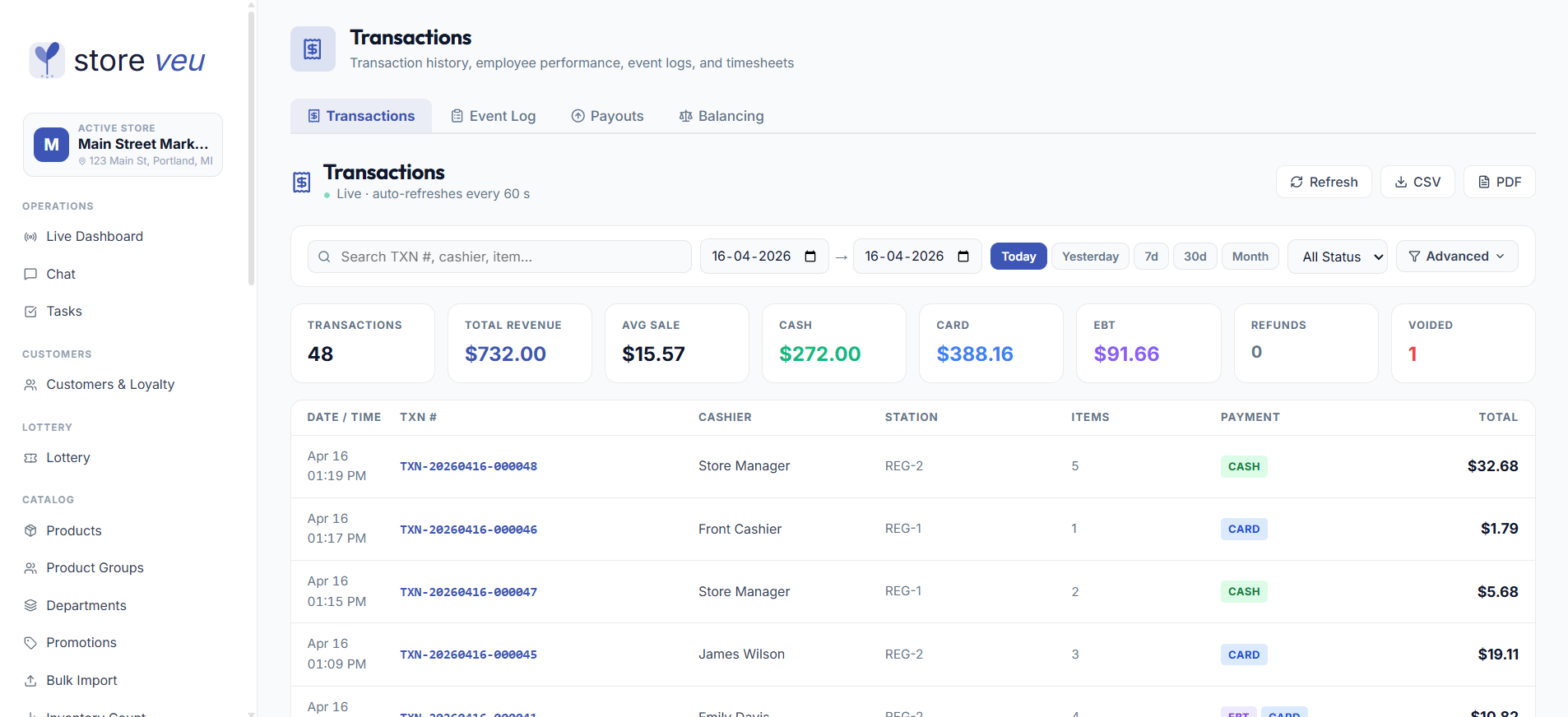
Daily-sale entry plus full transaction history with advanced filters and a receipt view.

Everything that crossed this counter today is in one end-of-day, split by tender, department and cashier.
- Z-outdaily close, fully split
- CSV + PDFexport on every report
- Saved layoutsrecurring views, one click
Built for how stores actually run it.
End-of-day (Z-out)
A complete daily close, cash, card, EBT, deposits, tax and lottery already split out.
Employee reports
Clock events, hours and timesheets by employee, exportable for payroll.
Sales & department reports
Sales by day, department, product and velocity, the numbers behind the dashboard.
Report hub & layouts
A central hub for every report, with saved layouts so your recurring views are one click away.
CSV & PDF export
Every report exports clean to CSV or PDF for your books, your accountant, or an audit.
Daily sale & history
Daily-sale entry plus full transaction history with advanced filters and a receipt view.
Good to know
Does the end-of-day report split out lottery and tax?
Yes. The Z-out separates cash, card, EBT, deposits, tax and lottery so the daily close matches the drawer without manual math.
Can I export for payroll or my accountant?
Every report exports to CSV or PDF, and accounting data can sync to QuickBooks Online for firms standardized on it.
Are there saved report views?
The report hub supports saved layouts, so your recurring reports are a single click rather than a rebuild each time.
Common questions about Storeveu
How much does Storeveu cost?
Every plan is priced per store and billed monthly. The software has a 3-month minimum, then runs month to month with no early termination fee. Starter covers the register, the back office and the AI assistant. Growth adds lottery, fuel, loyalty, invoice scanning and tobacco compliance. Restaurant is built for restaurants and bars, and Pro includes every add-on. Current prices are always on the pricing page.
Does Storeveu work offline?
Yes, for cash. The register is offline-first: it keeps ringing cash sales with no internet and uploads them on its own when the connection returns. Card terminals need the internet to reach the processor.
Is there a long-term contract?
The software has a 3-month minimum, then runs month to month with no early termination fee. Card processing is a separate 36-month agreement. Any early exit fee is listed on your application before you sign, and other charges can apply on a default, such as two months with no sales, so read the processing terms first. You can change tiers anytime.
Do I need special hardware?
No. Storeveu runs on standard Windows PCs with common receipt printers, cash drawers and Dejavoo terminals, bring your own, or buy the E15W dual-screen terminal.
How long does it take to switch from my current POS?
Most stores go live in 1-3 weeks. The team imports your catalog and customer list from systems like Square, Clover, Lightspeed or Heartland, usually overnight.
Can I manage multiple stores?
Yes. Run multiple locations from one back office with per-store pricing and inventory, plus a five-tier role hierarchy and custom roles.
Is my store data private and secure?
Every record is scoped to your organization and store, access is permission-gated by role, and one tenant can never see another’s data.
How do I get a demo?
Book a free 15-20 minute guided demo on a fully-loaded store, no obligation, no pressure. Use the contact page to pick a time, or call the sales line.
See reports & exports running on a live store.
A 20-minute guided walkthrough on a fully-loaded demo store. No obligation, no pressure.